Video submission guide

Share your performance.
Show your progress.

Your performance video verifies the repertoire you have learned. Choose the right review option, record a complete performance, and follow the steps below to submit it.

An account is required to submit a performance.

01 · Choose your review

Public or private?

Both routes help build your repertoire record. Only approved private evaluations count toward certificates.

Free · Community reviewed

Public Submission

Choose Public Evaluation in the submission form.

  • Submit a YouTube video link.
  • Other RTV users review your performance.
  • Approved performances may earn regular points.
  • Public submissions do not count toward certificates.

Your YouTube video must be Public or Unlisted so community reviewers can open it.

Paid · RTV admin reviewed

Private Evaluation

Choose this option for RTV admin review or certificate credit.

  • Use a YouTube link or upload a saved video file.
  • RTV admins review your performance.
  • Certificate performances require RTV admin approval.
  • Review the evaluation charge before paying.

Fees may vary with the piece, difficulty, length, or certificate requirements. See the certificate guide →

02 · Record your piece

A good recording starts here.

Record your performance on your phone, camera, or recording app first. Then upload the saved video file or add its YouTube link. Check these five things before you submit. Minor mistakes are acceptable; the performance still needs to be prepared and complete.

  1. The correct piece and version

    Match the title, arrangement, and version on the repertoire page. A performance submitted under the wrong piece will be rejected.

  2. The whole piece, in one take

    Record from beginning to end without cuts, edits, splices, or repeated restarts. Incomplete or edited-together performances will be rejected.

  3. The student, hands, and keyboard in view

    Keep the performer clearly visible. Both hands and the keyboard must stay in frame throughout the performance.

  4. Clear, easy-to-hear audio

    Listen to your recording before submitting. Avoid distortion, very low volume, excessive background noise, and unclear sound.

  5. A prepared performance

    Keep practicing if there are major note errors, repeated breakdowns, missing sections, or serious rhythm and tempo problems.

Hidden hands, unclear audio, incomplete performances, and edited footage cannot be reviewed reliably and may lead to rejection.

03 · Submit your video

Follow along, one step at a time.

These screenshots show RTV’s submission controls. Select any picture to enlarge it. Use the options and limits shown on your piece’s form.

  1. 01

    Find your piece and open “Submit Video”

    Find the exact piece in the Sheet Music Library, open its page, and scroll to Submit Video.

    If you see Login First, sign in and return to the piece page.

    Submit Video section with Login First buttonEnlarge screenshot ↗
    The signed-out view. Sign in to access the submission form.
  2. 02

    Choose a submission method

    For a free public submission, choose Youtube Link.

    For private evaluation, choose Youtube Link or Upload Video File. Uploaded files use private evaluation.

  3. 03

    Add your performance

    Follow the instructions for your chosen method. Check that the recording is for this exact piece before continuing.

    Using a YouTube link

    Paste the link to the individual performance into Add Youtube Link, not the link to your channel. Public-review videos must be Public or Unlisted.

    Add Youtube Link fieldEnlarge screenshot ↗
    Make sure reviewers can open the video.

    Uploading a video file

    Select Choose video file, pick your recording, and follow the size and length limits shown. Wait for the upload to finish.

    Choose video file control and upload limitsEnlarge screenshot ↗
    Direct uploads are for private evaluation.
  4. 04

    Choose who reviews your video

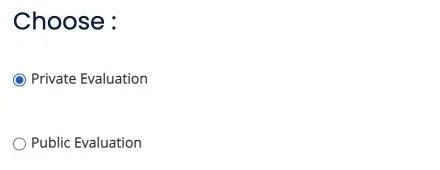
    Choose Public Evaluation for free community review and regular points, or Private Evaluation for paid RTV admin review.

    For certificate credit, select Private Evaluation. Public submissions do not count toward certificates.

    Private Evaluation and Public Evaluation choicesEnlarge screenshot ↗
    This example shows Private Evaluation selected. Choose the option that matches your goal.
  5. 05

    Check the details and continue

    Check the piece, recording, and evaluation option. Follow the submission button shown on your form.

    For private evaluation, choose Go to Checkout and review the charge before completing payment. Public submissions are free.

    Go to Checkout buttonEnlarge screenshot ↗
    Private-evaluation example. Review the amount on the next screen.

After you submit

Return to your account for the result.

Wait for review, then check your submission page or student profile for the result and feedback. If your performance needs more work, read the feedback before preparing your next recording.

Get Help →

Good to know

Before you send your recording.

Do I need a YouTube channel?

Yes, for public submissions. Upload your performance to your YouTube channel, set it to Public or Unlisted, and submit its video link. Private YouTube videos cannot be opened by community reviewers.

For private evaluations, you can also upload a saved video file directly from your device.

Does “Unlisted” mean “Private Evaluation”?

No. YouTube visibility and RTV’s evaluation type are separate choices. An Unlisted YouTube video can still be submitted for public community review. Choose Private Evaluation on RTV if you need admin review or certificate credit.

Can a public submission count toward a certificate?

No. Certificates require paid private evaluation and approval by RTV admins. Public submissions are a free way to earn regular points and build your repertoire record.

Can I submit a performance with mistakes?

Minor mistakes are acceptable, but your performance must be prepared, complete, and recorded in one continuous take. Continue practicing if there are major errors, repeated breakdowns, missing sections, or serious rhythm and tempo problems.

What will a private evaluation cost?

Check the charge shown before checkout. The fee may depend on the piece, difficulty, length, or certificate requirements. Certificate fees and private evaluation fees are separate; see the certificate guide for details.


Ready to share your progress?

Start with the repertoire page for the piece you have prepared.

Screenshot guide